Please wait..
Invoice OCR
This invoice OCR tool uses Optical Character Recognition processing to scan and extract data from invoices.
 Safe & Secure
 Fast Processing
 AI-Powered OCR
 Batch Processing
Working with industry leaders
We’re a proud partner of these globally recognized brands:


How to Use this Invoice OCR?
To extract data from an invoice, follow the simple steps that are given below:

Upload an invoice in the formats JPG, JPEG, PNG, BMP, GIF, WEBP, and PDF.
Click the “Convert” button to let our AI-powered OCR scan the invoice details.
Review the extracted information and download or copy the results.
What is Invoice OCR?
Invoice OCR is a technology that uses Optical Character Recognition to read text and data from invoice images or scanned documents. It extracts details such as invoice numbers, dates, customer names, item descriptions, quantities, prices, taxes, total amounts, and more.
Features of this Invoice OCR Scanner
This OCR invoice scanner offers multiple features that make it faster, easier, and more efficient.

AI-Powered:
AI-powered OCR technology automatically identifies invoice layouts, table structures, and key fields without requiring manual templates or setup.

Batch Processing:
Process multiple invoice images or PDFs at once to extract their information quickly instead of processing each invoice one by one.

Multi-Lingual Support:
Easily extract text from invoices written in different languages and scripts, making it easier to process international invoices.

Fast Invoice Processing:
Convert complex invoices into clean, structured data within seconds to eliminate waiting time and speed up routine data-entry workflow.

Freemium:
Use this Invoice OCR scanner for free with basic access, while premium plans offer higher usage limits and additional benefits.

Higher Accuracy:
Our tool combines AI and OCR technology to accurately extract text and key invoice details, even from low-quality scans and slightly blurry invoice images.
Free Online Invoice Processing
This tool allows you to automatically extract the key details from invoices free of cost. You don’t have to pay anything, give credit card details, or even install any software. Just open a browser on your mobile or desktop, upload an invoice photo to this tool, and get clean, structured text in seconds. This way, you can extract lots of invoice data instantly without manually typing every detail.
What Types of Invoices Does This Tool Scan?
This Invoice text extraction tool can extract data from a wide range of invoice types, including:
 Purchase Invoices
Tax Invoices (VAT/GST)
Retail Receipts
Service Invoices
Utility Bills
Proforma Invoices
Credit Notes
Commercial Invoices
International & Multi-language Invoices
Purchase Invoices
Tax Invoices (VAT/GST)
Retail Receipts
Service Invoices
Utility Bills
Proforma Invoices
Credit Notes
Commercial Invoices
International & Multi-language Invoices
How Does This Invoice Scanner Work?
The process usually follows these steps:
When you upload the photo or PDF of an invoice, this tool instantly converts your file into a processable digital format.
Automated algorithms clean up blurry text, straighten tilted pages, and fix contrast so every word is easy to read.
OCR technology identifies printed characters, numbers, and symbols from the invoice image.
AI algorithms find and separate specific key details, including vendor names, invoice numbers, dates, line items, and final totals.
The system double-checks mathematical totals, organizes them in a structured format, and presents you with ready-to-use invoice data.
Manual Invoice Data Extraction Vs Online Invoice OCR
Both methods can extract invoice information, but they differ in several key aspects, including:
Manual Invoice Data Extraction
- Time-consuming manual typing
- Higher risk of human errors
- Not suitable for bulk invoices
- Requires continuous manual effort
- Difficult to manage large datasets
- Lower productivity
Online Invoice-OCR
- AI extracts data in seconds
- Higher accuracy of extraction
- Supports batch invoice processing
- Minimal user intervention
- Easy to organize and export data
- Saves time and improves efficiency
Input Formats Accepted
| Format | Extension |
|---|---|
| JPEG/JPG | .jpg, .jpeg |
| PNG | .png |
| GIF | .gif |
| BMP | .bmp |
| WebP | .webp |
| Best For |
|---|
| Invoice photos, scanned invoices, and camera captures |
| Digital invoice screenshots, e-receipts, and lossless document exports |
| Static invoice graphics, simple web receipts, and digital billing snips |
| Uncompressed, high-detail raw invoice images and legacy document files |
| Web-based invoice images, fast loading web screenshots |
| Multi-page invoices, digital vendor bills, official e-statements, and bulk reports |
Output Formats Available
| Format | Extension |
|---|---|
| Microsoft Excel | .xlsx |
| Best For |
|---|
| Organizing extracted invoice data, editing details, calculations, and further analysis |
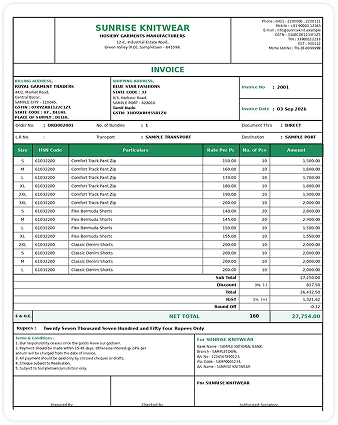
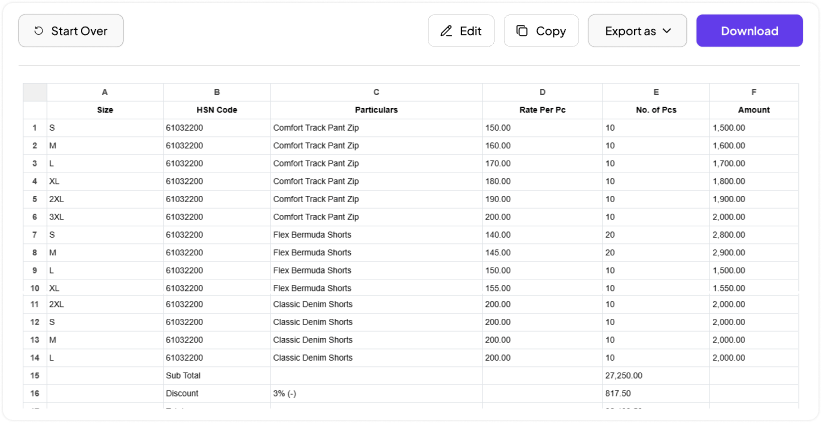
Your Image vs Output Result
See how Invoice OCR turns your uploaded invoice into accurate and structured data.
Before:
Your original invoice image with all details.
After:
Extracted invoice data ready to use.
Who Can Use this Invoice OCR Scanning Tool?
Everyone who wants to quickly and accurately extract structured data from invoices can use this tool, including:
Accounts Payable (AP) Teams
Speed up invoice processing and reduce manual entry errors during bill payments and reconciliation.
Business Owners & Freelancers
Instantly digitize receipts and utility bills to streamline personal book keeping without hiring extra accounting staff.
Tax Consultants & CPA Firms
Convert large volumes of client paper invoices into audit-ready spreadsheets for easier tax filing.
Finance Teams
Convert invoice information into digital data for easier review, record keeping, reconciliation, and financial reporting.
Procurement Teams
Easily extract purchase order (PO) numbers, item descriptions, and supplier costs to verify delivered goods against billed charges.
Enterprise Businesses
Process large numbers of invoices faster while reducing repetitive manual work across different departments.
Retail & E-commerce
Digitally record vendor shipments, inventory invoices, and store receipts to maintain up-to-date profit margin tracking.
Banks & Financial Institutions
Extract financial data from submitted receipts and invoices to speed up loan approvals, credit scoring, and expense verification.
Managing Business Invoices
Turn paper bills, PDF receipts, or scanned images into editable Excel or CSV files in a few clicks.
People Also Ask:
This OCR invoice tool supports common invoice file formats, including JPG, JPEG, PNG, GIF, BMP, WebP, and PDF. You can upload invoices in these formats and extract their text and important data.
Yes, this tool is free to use, offering all of its core features without purchasing a premium plan or hidden charges.
This tool works entirely online in your browser. No downloads or installation are needed — just open it and start using it.
Processing is fast, typically taking just a few seconds per invoice. The exact time may depend on the file size and number of pages you upload.
It extracts key invoice details such as billed-to and billed-from information, invoice number and date, line items, and totals.
The tool is optimized for printed and digitally generated invoices. Clearly written handwritten invoices may also be recognized, but accuracy can vary.
Yes, you can upload and process multiple invoices in a single batch instead of converting them one at a time.
Yes. Your privacy matters — files are processed securely and automatically deleted from our servers after conversion.
Yes, the tool can recognize and extract data from invoices written in multiple languages.







 Unlock Multiple